For parents & guardians
You paid for the phone. You should know what's on it.
Kioo gives you a window into your child's revision — what they've read, how they scored, where they're stuck — without turning study into surveillance.
Free forever. No adverts. No messaging between users. Nothing sold to anyone.
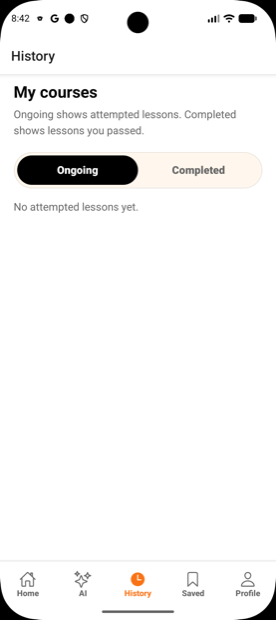
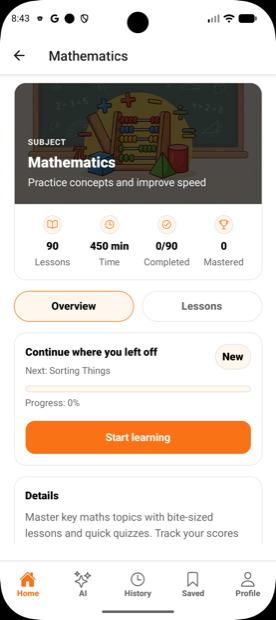
What Kioo actually is
A revision app for Primary 1 to Primary 7, built on Uganda's Competency-Based Curriculum, with an optional AI tutor for homework your child is stuck on.
3,151
Lessons
2–5 minutes each, illustrated by hand
9,451
Quiz questions
One quiz after every lesson
5
Core subjects
Maths, English, Science, SST, RE
P1–P7
Every primary class
About 450 lessons per level
Linking your account to your child's
Two accounts, one link. You don't need your child's password, and they can see that you're linked.
Make your own account
Download Kioo and sign up with your own email. Don't share a login with your child — the progress tracking depends on them being separate.
Open the Parent Portal
Go to Profile → Parent Portal → Link a child.
Enter your child's account email
We send a request to their account. Your child approves it in their app — consent runs both ways.
You're linked
Their activity appears in your portal, and you can pay for Pro on their behalf.
Either side can unlink at any time. Unlinking removes your visibility; it doesn't delete anything.
What you can see
- Which lessons your child has opened and completed
- Quiz scores, best scores, and which topics reached mastery
- Subjects they're spending time in — and the ones they're avoiding
- Their current study streak
- That the AI Tutor was used, and on which subject
- Subscription status and payment history, if you're paying
What you can't
- Their password — we never show it to anyone, including you
- Anything outside Kioo: no other apps, no browsing, no location
- Live tracking of when they pick up the phone
Kioo is a progress report, not a monitoring tool. We think that's the right line for a study app, and older pupils are far more likely to use something that respects it.
Safety, plainly stated
No one can contact your child
Kioo has no chat, no comments, no profiles, no friend lists and no way for one user to find another. There is no stranger-contact risk because there is no contact at all.
No adverts, ever
No third-party advert networks, no advertising identifiers, no behavioural profiling. Kioo is paid for by subscriptions, not by your child's attention.
Nothing is sold
We do not sell personal data to anyone, for any purpose. See the privacy policy for the full list of who we share data with, and why.
The AI stays on schoolwork
The tutor is bounded to primary-school subjects and refuses everything else. Images and questions are filtered, and every answer carries a report button. See the AI policy.
Photos are not kept
A homework photo is used to produce an answer, then deleted. It is never used to train an AI model.
You can erase everything
As a linked parent you can request deletion of your child's account and all its data at any time. Here's how.
Getting the most out of it
A few things we've seen work.
- Short and daily beats long and rare. Lessons are 2–5 minutes on purpose. Two lessons a day is a real revision habit; an hour on Sunday isn't.
- Let the streak do the nagging. It's a better motivator than you are, and it costs you no arguments.
- Look at the quiz scores, not the lesson count. Opening lessons is easy. Scoring 70%+ is the number that means something.
- Use read-aloud for P1–P3. Younger children get much further with a lesson when they can listen along.
- Ask your child to explain the AI's working back to you. If they can, they've learned it. If they can't, they've copied it — and that's the moment to slow down.
- Follow-up questions are free. Teach them to ask the tutor "why?" rather than snapping a second photo. It costs no credits and it's where the learning is.
Paying for Pro
Kioo Pro is UGX 15,000 a month and unlocks the AI Homework Tutor — around 30 photo questions a month, with free follow-up chat. Everything else stays free whether you pay or not.
You can pay with MTN Mobile Money, Airtel Money or a card, from your own phone, on your child's behalf. Receipts come to you and you control the cancellation.
Parents ask us
Isn't an AI tutor just a cheating machine?
It can be, if it's used to copy answers — which is why Kioo's tutor is built to show the working rather than hand over a final number, and why follow-up questions are free while new photos cost a credit. The economics push towards understanding. But you are the real safeguard: ask your child to explain the steps back to you.
Will it match what my child's school teaches?
The content follows Uganda's Competency-Based Curriculum, so the topics line up. Individual schools sometimes teach a different method for the same thing, particularly in maths. Where they differ, the school's method is the one that counts in the exam.
Does my child need their own phone?
No. Plenty of families share one handset — your child signs in, studies, and signs out. Progress lives on the account, not the device.
How much mobile data does it use?
The illustrations are the heaviest part. Opening lessons over Wi-Fi where you can, and letting them cache, keeps it modest. There are no videos and no autoplaying media.
What if I don't want my child using the AI at all?
Simply don't subscribe. The AI Tutor is locked on the free tier, so the whole lesson and quiz library is available with no AI involved whatsoever.
My child is older than P7 — is it still useful?
For revising primary foundations before secondary, yes. Kioo's content stops at P7; we don't pretend otherwise.
Try it before you decide anything
The whole library is free. Download it, sit with your child for ten minutes, and see.